


WispLens
3.66.00 Reviews
App Specs
- Version
- 8.5
- Updated On
- License
- Free
- Downloads
- 10,000+
- Developer
- JETS GROUP
- Categories
- Video Players & Editors
- Platform
- Android
Screenshots
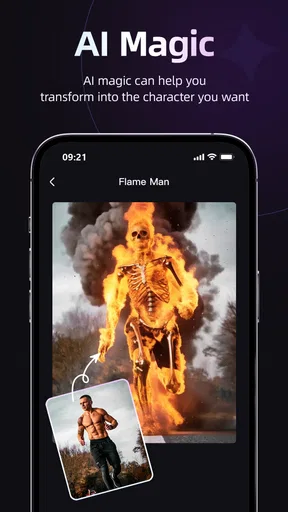
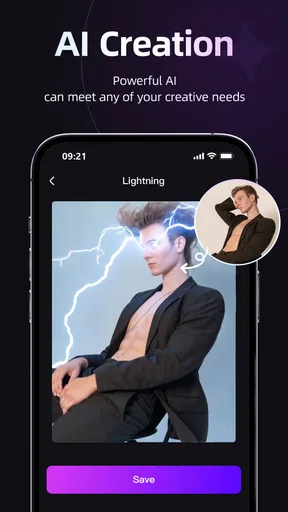
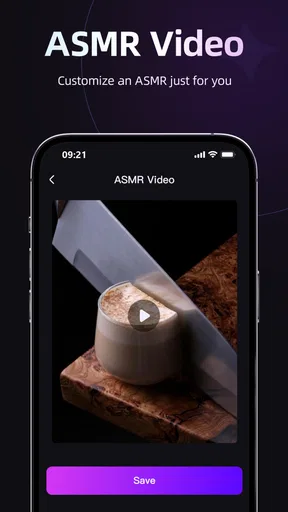
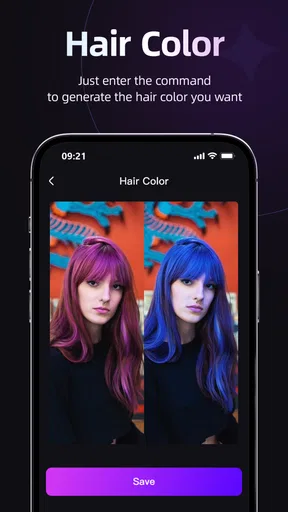
 Analysis by AppCompare
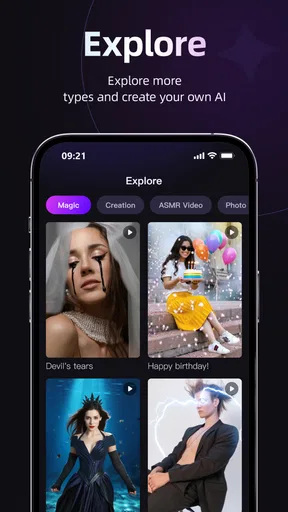
I spent time with WispLens as an AI-focused video creation app, and my first impression is that it is aimed at people who want to experiment with generated video without starting from a traditional editing timeline. It belongs to the Video Players & Editors category, but its identity is closer to an AI video generator than to a standard player or trimming tool. That distinction matters: if you expect a complete replacement for a desktop editor, you may find the experience limited, while users looking for a quick creative starting point may find it more appealing.
The app is developed by JETS GROUP and is available free of charge, with optional in-app purchases ranging from $4.99 to $39.99 per item. I see that pricing structure as an invitation to try before spending rather than an automatic reason to buy. The free entry point lets you judge whether the generation workflow fits your habits, while the paid options require a more personal decision about how often you create videos and whether the extra value is meaningful to you.
How WispLens fits into everyday video creation
What makes this app different from a conventional mobile editor is the starting point. In a familiar editor, I usually begin with clips, photos, music, cuts, and transitions already in hand. With WispLens, the appeal is the possibility of turning an idea into a visual result through an AI-led process. That makes it useful at the earliest stage of a project, when I have a concept but not yet a finished collection of media.
For example, I can imagine using it when planning a short social post, a visual mood board, a playful message for a friend, or a rough concept for a larger video. Instead of spending time searching through old recordings, I can first explore what kind of visual direction feels right. That is a different job from polishing a completed video, and the app makes more sense when judged on that job.
The store summary identifies it as an AI Video Generator, while the short description is simply WispLens. I would therefore approach it as a focused creative experiment rather than a full production suite. The name is easy to remember, but the important practical question is whether its generated output matches the kind of content I want to make. AI tools can be exciting when the result is close to the idea, yet frustrating when the output needs too much correction before it becomes usable.
Compatibility is fairly broad for older Android devices because the app requires Android 7.0 or later. That makes it accessible to people who are not using a recent phone, although the actual comfort of creating video can still depend on the device. AI-oriented tasks may feel more demanding than simply watching a clip or making a basic cut, so I would test the app on the phone I plan to use rather than assuming that the minimum operating system requirement guarantees a smooth experience.
The app is rated for Everyone, which makes its positioning approachable for a wide audience. That does not mean every generated result will suit every viewer or every publishing context. I would still review anything created by an automated tool before sharing it, especially if the video is intended for work, school, a public account, or a message where visual mistakes could be embarrassing.
Worth Reading Before You Choose

Flipboard Shows What News Apps Must Do Beyond the Feed

Switching to Android Auto Means Rethinking Your Driving Routine

Google Calendar Makes a Crowded Week Easier to Manage

Ludo King Makes the Most of the Minutes Between Plans

Baby Panda World Brings Quick Play to Modern Phones, but Its Game Library Feels Busy

ESPN’s Live Game View Makes Following Close Games Easier
What the free starting point really means
The free download is one of WispLens’s strongest practical advantages because it lowers the risk of trying an unfamiliar creative method. I can install it, explore the workflow, and decide whether AI-generated video is genuinely useful to me before committing money. That is more valuable here than a polished promise, because the usefulness of generated media is highly personal: one person may enjoy rapid visual experiments, while another may prefer precise manual control.
Still, free access should not be confused with unlimited value. The app includes purchases priced from $4.99 to $39.99 per item, so anyone considering regular use should check the purchase screen carefully before treating the free version as a complete long-term solution. I would pay attention to what each purchase unlocks, how often I expect to use the app, and whether the result saves enough time to justify the expense. Those are the questions that determine value more reliably than the existence of a free install.
I especially like the idea of using the free version as a short evaluation period. I would create several different kinds of projects rather than judging the app from one lucky result. A simple scene, a more specific concept, and a video intended for actual sharing can reveal different strengths and weaknesses. If only the first experiment feels enjoyable, I would not move to a paid purchase yet.
There is also a useful distinction between paying for occasional inspiration and paying for dependable production. A small purchase may make sense for someone who wants to explore an idea now and then. The higher-priced option needs a stronger reason, such as repeated use or a workflow that genuinely replaces another tool. Since the purchase amounts are known but the exact benefits depend on what is offered inside the app, I would make that decision from the in-app explanation rather than assuming the most expensive choice is automatically the best one.
Where the app can save time
The biggest potential benefit is the shift from editing every visual detail to describing or shaping a creative direction. For a person who is comfortable with ideas but not with timelines, layers, and manual effects, that can make video creation feel less intimidating. WispLens may also help when I need several visual possibilities quickly and do not want to film or assemble each version from scratch.
A realistic everyday scenario would be preparing a short announcement for a small event. I might know the mood, subject, and message I want, but lack suitable footage. I could use the app to explore a visual concept, then decide whether the generated result is good enough to share or useful as a reference for a more carefully edited version. In that situation, the app has value even if it does not produce the final video, because it helps me move from a vague idea to something concrete.
Another practical use is personal storytelling. Someone returning from a trip may want a visual memory but may not have recorded enough consistent footage. An AI-generated sequence could provide a stylized companion to photographs or notes. I would treat it as interpretation rather than documentation, though. The more important accuracy is, the less comfortable I would be relying on generated imagery without checking every scene.
For social creators, the attraction is speed and experimentation. A creator can test a visual theme before investing in filming, props, or a detailed edit. The trade-off is that speed only counts as a benefit if the output needs little correction. If I spend as long fixing an unsuitable result as I would have spent editing manually, the advantage becomes much smaller.
Three habits that make the experience more useful
My first recommendation is to begin with a narrow idea instead of a broad request. A vague concept such as “make something exciting” leaves too much room for an output that does not match the intended audience. A more focused direction gives me a better basis for judging the result, even when the app’s generation does not behave exactly as expected.
Second, I would separate idea generation from final editing. WispLens is most interesting when it helps me discover a direction, while a conventional editor remains better suited to exact timing, captions, audio balance, and a carefully controlled sequence. Trying to force one app to handle both jobs can create unnecessary frustration. Using generated material as a draft or visual ingredient is often a more realistic workflow than expecting it to be the entire production.
Third, I would keep a simple record of which kinds of prompts or concepts produce useful results. This is a less obvious advantage of experimenting consistently: over time, I can learn whether the app works better for abstract visuals, simple scenes, personal messages, or promotional ideas. That knowledge helps me decide whether a paid purchase is worthwhile. It also prevents me from spending repeatedly on random experiments that do not lead anywhere.
A fourth habit is to inspect the result at normal viewing size before sharing it. Generated video can look impressive at a glance while containing distracting details when watched more carefully. I would check faces, text, object continuity, movement, and whether the overall sequence communicates the intended idea. This review step is essential if the video represents me publicly.
Where traditional alternatives remain stronger
Compared with a standard mobile video editor, WispLens is less appealing when I already have all the footage I need and simply want accurate control. Traditional editors are usually the better choice for trimming a family recording, arranging clips in a known order, adding precise captions, or matching cuts to music. Their strength is predictability: I choose the source material and decide exactly how it appears.
Compared with a regular video player, WispLens also serves a completely different purpose. A player is designed for watching existing content efficiently, while this app is about creating or exploring visual content. Someone who only wants smooth playback, organization, or basic viewing should not install it expecting those priorities to define the experience.
Compared with a more established professional editor, the likely advantage is accessibility rather than depth. I would choose WispLens when the creative starting point matters more than detailed manual control. I would choose the established editor when the project has fixed requirements, a deadline, brand guidelines, or footage that must remain faithful to the original. These are not competing needs so much as different stages of making video.
The main limitation is therefore not simply that AI can make mistakes. It is that an automated result may be difficult to steer with the precision some projects demand. If I need a specific person, exact wording, consistent objects, or a repeatable visual identity, I would be cautious. The app may still help with a draft, but I would not make it the only tool in a workflow where accuracy is non-negotiable.
Who is most likely to get value
WispLens is a good fit for curious beginners, casual creators, and people who often have visual ideas but lack footage or editing confidence. It may also suit users who enjoy trying several creative directions before deciding what to make. The free access is particularly helpful for this group because it allows a practical test without requiring an immediate purchase.
I can also see value for students working on informal visual presentations, hobbyists making personalized messages, and social users who want something more distinctive than a basic slideshow. The app’s Everyone rating and support for Android 7.0 or later make it approachable from an access standpoint, although the quality of the experience will still depend on the phone and the user’s expectations.
People who should skip it are those seeking a dependable professional editor, exact visual continuity, or a tool centered on watching videos rather than generating them. I would also hesitate to recommend it to anyone who dislikes trial and error. AI creation often involves adjusting an idea, reviewing the result, and deciding whether another attempt is worth the time. If that process sounds irritating rather than creative, a manual editor may be a better match.
The app’s current average rating is 3.6 from roughly three dozen ratings, with six written reviews. I read that as a reason to keep expectations measured. There is enough public feedback to show that people are trying it, but not enough to treat the rating as a definitive verdict for every type of user. My own decision would still depend mainly on whether the free experience produces results I can actually use.
My buy-or-skip decision
I would try WispLens before paying, especially because the app is free to install and its purpose is easy to evaluate through hands-on use. For me, the sensible path is to test several projects, inspect the outputs carefully, and only then consider an in-app purchase. The available purchase range, from $4.99 to $39.99 per item, makes it important to connect spending with a clear use case rather than buying out of curiosity alone.
I would consider paying if the app consistently helps me reach a visual starting point faster than my usual process. That could mean generating a concept for a social post, creating a stylized personal message, or producing material that I can refine elsewhere. I would skip the purchase if the results are mostly interesting demonstrations but rarely suitable for my actual needs.
JETS GROUP presents WispLens as an AI video creation option rather than a conventional editing utility, and that is the right way to judge it. Its value comes from experimentation, speed, and lowering the barrier between an idea and a visual draft. Its weakness is the reduced certainty that comes with automated generation. My recommendation is to try the free experience, keep a traditional editor nearby, and pay only when the app proves it saves you real creative time.
Pros
- Simple interface makes core features easy to access.
- Lightweight design should work well on many older devices.
- Useful for quick visual checks without a complicated setup.
- Clear controls make the app approachable for first-time users.
- Convenient for occasional use when you need fast results.
Cons
- Some features may require permissions that privacy-conscious users dislike.
- Results can vary depending on lighting
- camera quality
- and device hardware.
- The free experience may include ads or feature restrictions.
- Limited customization may disappoint users wanting advanced controls.
- Performance could be less consistent on older or budget smartphones.
FAQs for WispLens
What is WispLens and what can I use it for?
WispLens is an image-focused mobile application designed to help users view, analyze, or enhance visual content through a simple smartphone interface. Depending on the version and available tools, it may be useful for examining pictures, applying visual effects, or exploring details that are difficult to notice at first glance. Before downloading, check the current store description because features can vary by platform and update.
Is WispLens free to download and use?
WispLens may be available as a free download, but some functions can be limited by advertising, in-app purchases, subscriptions, or usage restrictions. We recommend reviewing the Google Play or App Store listing carefully before installing it, especially the pricing section and trial conditions. If a subscription is offered, confirm its renewal terms and cancellation procedure so there are no unexpected charges.
Does WispLens require special permissions or access to my personal data?
Because WispLens works with visual content, it may request access to your camera, photo library, or device storage. These permissions are normally needed to capture or import images, but you should still review them before granting access. Check the developer’s privacy policy to understand whether photos, analytics, identifiers, or other information are stored locally, processed online, or shared with third parties.
Can I use WispLens without an internet connection?
Offline functionality depends on how WispLens processes images and which tools you use. Basic viewing or previously downloaded content may work without an internet connection, while cloud-based analysis, online galleries, advertisements, account synchronization, or certain advanced effects may require mobile data or Wi-Fi. If offline use is important to you, test the app in airplane mode after installation and verify which features remain available.
Is WispLens compatible with my Android or iPhone?
Compatibility depends on your device model, operating system version, camera capabilities, and the minimum requirements published by the developer. Before downloading WispLens, open its official Google Play or App Store page and compare those requirements with your phone or tablet. Keeping the operating system updated can improve stability, although older devices may still experience slower processing, reduced features, or occasional crashes.


